



| THE WALKTHROUGH RentHop’s monthly newsletter for advertisers Advertising tips & tricks for April 2026 |
Welcome to The Walkthrough
Returning to the platform for the busy season? A seasoned advertiser who’s never left? RentHop’s monthly newsletter is designed to help you get the most out of the platform. In this email, you’ll find:
- New features: Fee breakdown for post-FARE advertising
- Advertising tips: The importance of reviews to optimize your listings and HopScore
- Earn more credits: The spring double referral bonus and free training presentations
Sharpen your advertising, showcase listings smarter, and stay connected with RentHop — so you can focus on what matters most: taking your clients on a walkthrough of their future home.
🎉 Double Referral Bonus
We just launched a limited-time referral bonus designed to reward both you and the agents you bring onto RentHop Pro.
When you refer another agent to any RentHop Pro Plan:
- You receive 100 Pro Credits when they sign up
- They receive 100 Pro Credits when they sign up
- You both earn 50 Pro Credits every month you stay active — for up to 5 months
That’s up to 350 bonus credits EACH — from a single referral.
How to claim:
- Stay subscribed to any RentHop Pro Plan
- Refer another agent to any Pro Plan
- Email support@renthop.com with your referral CC’d
- You both receive your credits and ongoing monthly bonuses*
*Bonus credits are awarded after the referral signs up. Monthly credit bonus requires continuous active subscriptions for both users.
New Features
With changes stemming from the FARE Act, this summer your advertising will look different in many ways. One of those ways is the Fee Breakdown option in listing creation.
Located below the Open House scheduler and above Listing Visibility / Repost Frequency, the Fee Breakdown allows you to provide further clarity on the fees associated with your listing. Below is an example of how to set up a listing (in this scenario, the advertiser is using the net effective price).
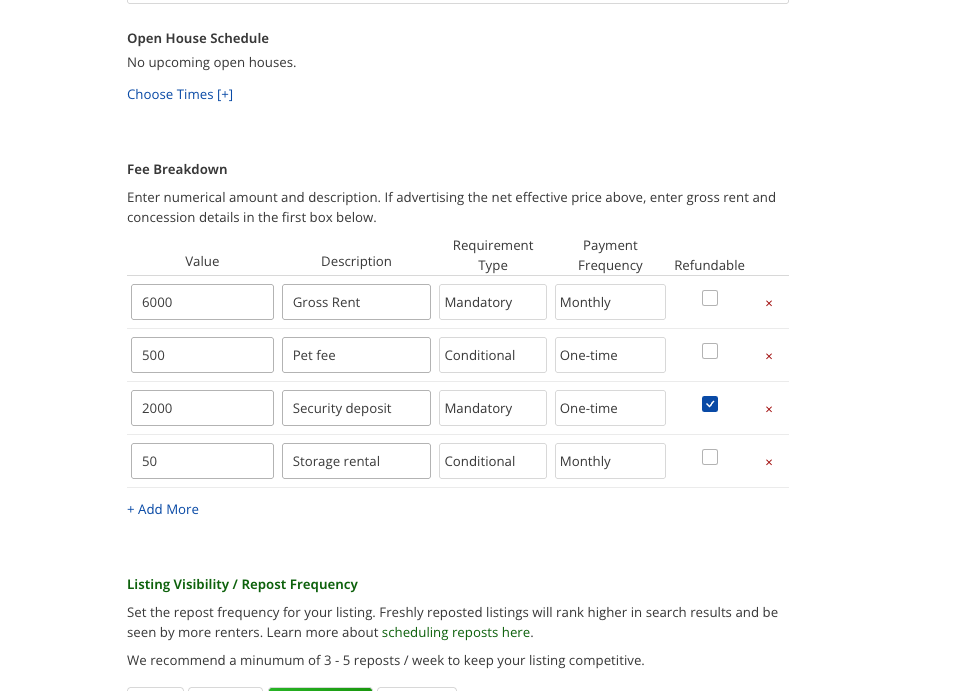
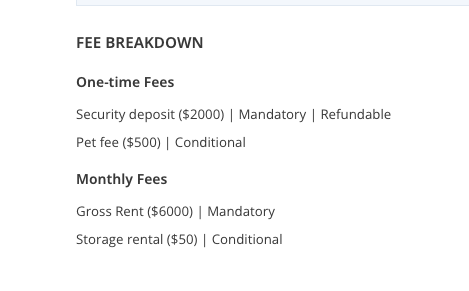
To the left, you can see how fees are displayed at the bottom of the listing. The breakdown minimizes renter confusion surrounding costs associated with renting an apartment.
Advertising Tips
With the busy season around the corner, you may have heard from our newest teammate, Rohan Sinha, who’s here to help you get the most out of your account.

Rohan Sinha
One of the simplest ways to strengthen your profile — beyond keeping it fully filled out — is by adding Renter Reviews.
Whether requested through the platform or pulled in from sites like Google or Yelp, reviews don’t just boost your HopScore — they give renters a clearer sense of who you are before they ever reach out.
Because renters can’t leave a review unless they’re invited, the first step is reaching out. You can do this through the “Request a Review” feature in your Reviews tab, or directly from any conversation in your Messages portal.
If you already have reviews on external sites, email support@renthop.com with the link and any details to help our team locate them. Have more than three to upload? Use this guide to streamline the process. More details on reviews and the Manager Reputation component to your HopScore can be found in the Agent Guide.
Refresh Your Knowledge
Join our weekly Wednesday presentations
These 30-minute virtual sessions are designed to help you maximize lead generation on RentHop. There is time for Q&A at the end.
A special bonus will be given to agents who attend this presentation for the first time and who have an active Pro Plan subscription.
 Your Privacy Choices


